
Squad & Shared Memory
Choose Agents and Models for Squad Roles
By TermSquad · Last reviewed
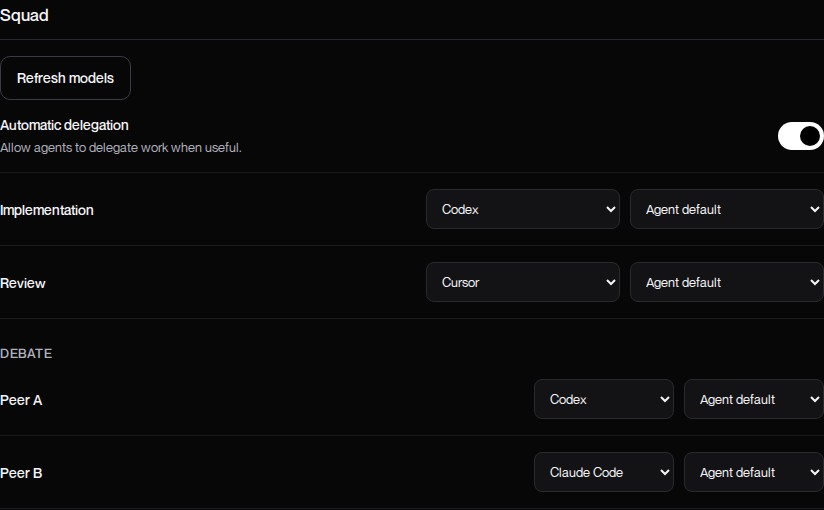
Choose Squad agents and models in Settings → Squad. These preferences belong to the selected computer and are used when a task requests the corresponding role.
Configure the roles
- Install and connect the agents under AI tools.
- Find the Squad section.
- Select Refresh models to update supported catalogs.
- Choose an agent for Implementation.
- Choose an agent for Review.
- Under Debate, select Peer A and Peer B.
- For each role, select a listed model or Agent default.
- Select Save changes and wait for confirmation.
Agent default leaves model selection to that agent’s configuration. It does not necessarily mean the same model on every computer.
Leave a role open when appropriate
Implementation and Review can use Ask when orchestrating. This allows you to choose an agent for a session when that role becomes necessary.
A saved machine-wide role and a choice for one task are different scopes. Tell the lead if you intend an override for only the current task.
Resolve unavailable choices
An agent marked Unavailable or Not connected needs attention before it can work reliably. A previously saved model can also become unavailable.
Refresh the catalog, confirm provider access, and select a model that is actually listed. Do not replace a failed model with an arbitrary name.
If no suitable catalog is returned, see Squad model troubleshooting. To understand the responsibilities, read How Squad Works.