
Files & Projects
Preview Markdown, Images, and Other Files
By TermSquad · Last reviewed
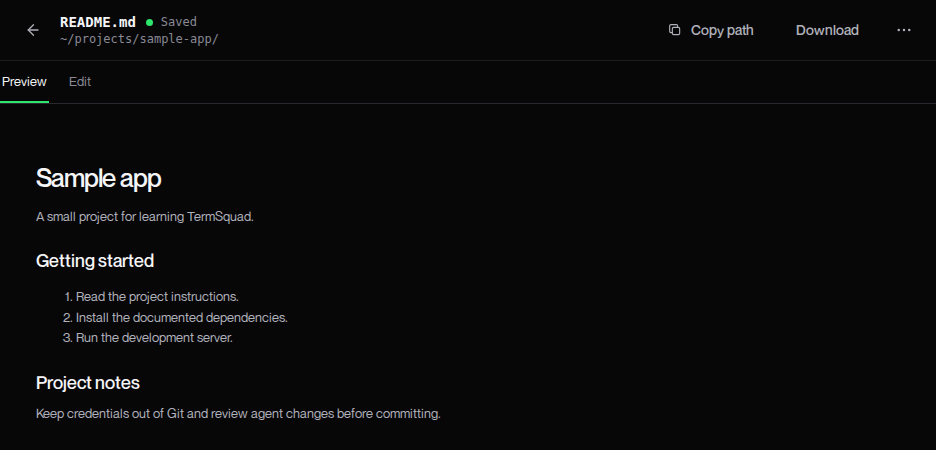
TermSquad chooses a viewer based on the file type. Markdown opens with a rendered preview, supported images open visually, and code or text files open in the editor.
Preview Markdown
- Open a Markdown file from Files.
- Use Preview to read headings, lists, and other supported Markdown formatting.
- Switch to Edit to change the source.
- Save the file when you want those changes written to disk.
The preview does not execute embedded HTML. A README that looks different from another Markdown viewer may rely on formatting that this preview does not support.
Preview images
Open a supported image such as PNG, JPEG, GIF, or WebP. The image viewer helps you inspect assets and screenshots stored on the computer.
An image preview is not an image editor. Use a suitable tool to modify the original asset.
When preview is unavailable
You may see File preview isn’t available for an unsupported format, a binary file, or an oversized text document. Use Download to open it in a suitable local application, or Copy path to work with it in the terminal.
The text preview limit is currently 1 MiB. That limit does not mean the file has been deleted or corrupted.
Check updates carefully
The viewer can refresh content changed on the computer. If you also have unsaved edits, resolve the conflict deliberately rather than overwriting an agent’s work accidentally.